
Have you ever noticed that the number of conversions displayed in your reports is smaller than the actual amount shown in the CRM? If yes, you should have already gone through dozens of various methods on how to fix that. To implement GA4 server-side tracking is one of the easiest and most effective approaches, but how to “sell” this idea to the stakeholders or convince your colleagues that such a switch is necessary? If you need a comprehensive explanation of all the benefits, you are in the right place.
Server-side tracking explained in simple words
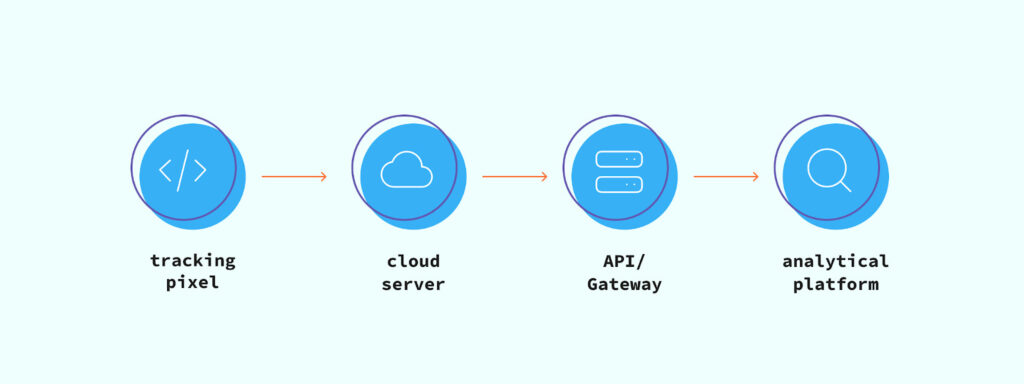
The essential idea of server-side tracking revolves around changing the destination where data is sent from a browser. When a script fires on a website, the information is sent to your server. This solves several popular issues simultaneously:
- it minimizes the effect of Safari’s Intelligent Tracking Protocol and its analogues that block third-party cookies by turning all the data into first-party one;
- it boosts your compliance by accumulating all the data on the first-party server and allowing you to hash or remove all the sensitive data before sending the package to analytics;
- it makes your tracking less affected by ad blockers, allowing you to fill the gaps the latter cause when stopping tracking scripts from firing.
Thus, a switch to server-side definitely allows you to process more data, staying on the safer side in terms of compliance with privacy policies.
Direct impact on GA4
Theoretical advantages of server-side tracking are clear, but what are the exact benefits for businesses that use GA4? Without further ado, let’s take a look at what it improves.
Attribution
It is important to establish the basic understanding of the problem: broken attribution does not mean you get less data. Instead, you get a misleading one. Your effective strategies may look, in this case, like those not deserving any personal and financial investment, while miracles can be seen where there are none. In other words, broken attribution makes all your activity and efforts reactive, not strategic.
Server-side tracking transfers the main processes from a browser to a first-party server, creating a more stable and robust connection between the customers and sessions. It also allows you to add the data about offline conversions to the overall package, providing an even more accurate background for analysis.
Data completeness
Ad blockers, browser restrictions, and numerous other issues data tracking faces nowadays may lead to a 20%-50% data loss, depending on how lucky you are. This is already not a “minor issue”; it is a full-scale strategic crisis.
Google Analytics 4 is a modern version of the popular platform that actively adopts Machine Learning algorithms. Despite all its benefits, this approach heavily depends on the quality and accuracy of the received data. When the latter two are low, something similar to the domino effect occurs: algorithms fail → wrong decisions are made → irrelevant knowledge is acquired by the platform → more wrong decisions are made → more irrelevant knowledge acquired, and so on.
Server-side tracking simply covers the reasons here, drastically decreasing the amount of lost data. Thus, the domino effect occurs in the opposite direction: the algorithm studies on more realistic and relevant data → it makes reasonable decisions → it studies on updated, realistic data.
Configuration advice
Not to dive deep into the technical domain, there are two basic approaches to configuring a server-side tracking setup: manual and with assistance. In the first case, you get flexibility and power to set up everything to the tiniest detail as you need. In return, it requires a certain level of expertise to make everything work.
If you do not have this expertise and want to focus on marketing, data analysis, and promotion of your product, you can delegate the technical aspect to specialists. Partnering with platforms like Stape, you get everything done in almost no time. The only thing left to you is to add the needed tags in the server container and configure them properly. Add to this additional benefits, such as Custom Loader (a solution for bypassing blockers effectively) or Website Tracking Checker (a free diagnostics tool) from the named platform, and you get a solid and effective infrastructure with little effort other than financial.
Conclusion
For a company that uses GA4, a switch to server-side tracking is a win-win decision: it solves all the major issues by guaranteeing more accurate attribution, better data quality, and more robust strategic decision-making. The fact that there are companies that can set everything up and cover maintenance while you focus on the sales and advertising makes the switch much simpler nowadays. Moreover, this switch is also your investment in the future, because it guarantees that your infrastructure will be less affected by whatever browsers or regulators do next.






 English
  Nederlands